Join Us On Facebook

|
|
|
|
How To - Adding Pics to Posts
There are two ways to add pictures to your threads. The first way is by using the file manager provided here at GliderCENTRAL and the second way is to use imag tags. To view larger versions of any of the pictures in this tutorial, click on them.
To use the file manager provided right here, you must be in the full reply screen to see this option.
• Click on File Manager.

• A new window will open that looks like this.

• Click Browse.

• Go to your pictures folder and select (double click) the image you want to add to the File Manager:

• This will add your photo to the file manager. If you like, you can click on the box and add your own description or caption for your photo. This step is optional. When finished, click on Add File.

• You will see where your picture has been uploaded. There is also a remove option here in case you goofed and selected the wrong photo or if you change your mind. Simply click remove to remove it.

• If you want more than one picture added, just repeat the previous steps. You can upload up to five photos into the file manager in every forum except the classifieds. Classifieds limit the uploads via the file manager to two. Keep this in mind when posting and using the file manager. If you try to upload more than the set limit, you will encounter an error. The file manager will list all the pics it has ready to add to your post.
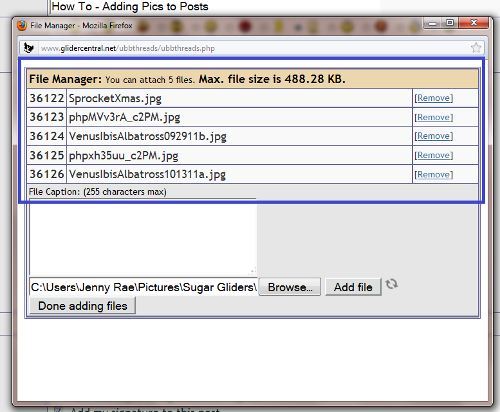
• Click on Done Adding Files:

• Now, next to File Manager in your post, it will tell you how many files (pics) it has ready to add to your post. At this point, you can still click on file manager to go back into the manager and remove files or add different files.

• Click Submit to submit your thread. The pic(s) you added to the manager will appear as clickable links. If you added descriptions or captions, they will appear below the actual file name.

This next method is all about how to add pictures using an IMG code. Once you get the hang of it, this is a very quick and easy way to upload a photo to your post.
This method does require that you use a picture hosting site such as Photobucket (which is what I will use for this part of the tutorial).
• Go to your hosting site and click upload:

• Click Select Photos and Videos:

• Select the photo you want to upload. You can select multiple pics at this point by holding Control as you choose your pictures. For the sake of this tutorial, I will only be using one.

• Click on View Album:

• Once in your album (again, this is using Photobucket), you can hover over the picture and little links appear below the pic. You want the IMG code! Click on it to copy it in photobucket. Now, go to your post and click paste. Once this code is pasted into your post, your pic has been added!

• There are other ways of doing this, but I find this way to be the most direct and simple. You can click on a picture in your photobucket album and find the same IMG code on the right side of the screen and use that as well.
You can also use the direct link. Let's say you have a picture on Facebook that you want to share. Go to that picture and open it in a new tab or window. Right click on the picture and click on View Image Info:

• A new window opens. Copy the location of the picture (make sure to get the entire thing!):

• Now, go back to your post here on GliderCENTRAL and select the enter an image icon:

Select the way you want your pic to post. Most choose the top option (Insert a non-floating image). This produces pictures as seen in this tutorial. Paste the address you copied previously (control + V) into the box and click okay. This will add your picture directly to the post!
I hope this tutorial helps out with how to add pictures to posts. I know it may look complicated at first glance, but I promise that it gets really easy with just a little practice.
Good luck and enjoy sharing pictures!
|
|
|
|
|
If you feel your glider is sick, please seek immediate veterinary assistance. The information on this page and in the correlating articles is for general educational purposes and is not intended to replace proper vet care. Please do not try to self-diagnose or self-treat your glider.
|
|
|
|

Please click above to see how you can help!!
|
|
|
0 registered members (),
1,181
guests, and 190
spiders. |
|
Key:
Admin,
Global Mod,
Mod
Owner,
Admin
|
|
|
Forums132
Topics10,423
Posts159,376
posts in the last 24hrs0
Members7,405
| |
Most Online47,475
May 21st, 2026
|
|
This site was tested and is best
viewed in Google Chrome & Mozilla FireFox


Download your copy today!!!
|
|
|


